After you order a long-term measurement, an account is created for you within 1-2 days.
You will receive an email (sent to the address you provided) with a link to sonotrazer.ch. Follow the link and set a new password for your account.
A second email is then sent so you can confirm your address. Once confirmed, you can sign in with your email address and the password you chose.
After signing in you land on the My Profile page.
E-Mail
Use this button to add or change an email address. After every change a confirmation email is sent to prevent unwanted addresses. Unneeded addresses can be removed.
You will receive an email (sent to the address you provided) with a link to sonotrazer.ch. Follow the link and set a new password for your account.
A second email is then sent so you can confirm your address. Once confirmed, you can sign in with your email address and the password you chose.
After signing in you land on the My Profile page.
My Profile
This page shows your address details and the following buttons:- My Info — edit contact data
- E-Mail — add / change address
- MFA — enable multi-factor authentication
My Info
Change contact data such as name or address. The default values equal those you provided when you rented the device. Your data is never shared and is visible only to you.MFA
Enable multi-factor authentication (e.g. Google Authenticator). For security you must re-enter your password. Scan the QR code with an app of your choice and download the ten recovery codes for safekeeping. MFA can be disabled at any time.
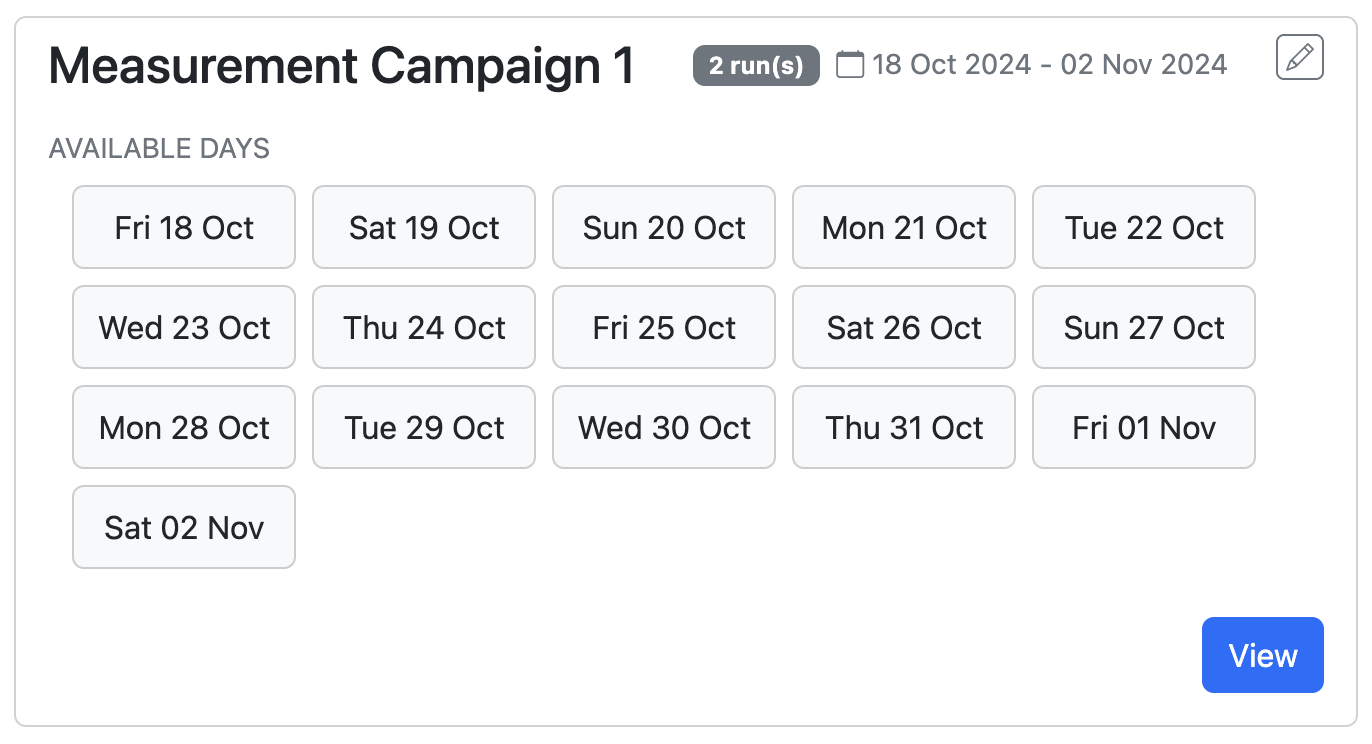
Your personal measurement campaigns are listed under Measurements. New data is uploaded only after the device is returned. Every campaign box shows:
Below are the level-time curves of the active frequency groups. Each group has its own colour. For clarity, show no more than five at once; click a group in the legend (at the upper edge of the level-time curves) to hide its curve.
The Evaluation graph starts in zoom mode; drag to enlarge a region. Extra controls include Pan and Autoscale. Double-clicking within the graphic will show again the complete view. Events appear as dashed vertical lines annotated with their names. Zoom actions affect both spectrogram and curves synchronously.
Z - linear (no weighting)
A - approximates 40 phon curve; standard legal metric, representing human perception
C - based on 80 phon curve; for loud sounds
ISO 389-7 P1 - threshold of hearing for the most sensitive 1 % of listeners; values below 0 dB can be considered inaudible
The chosen weighting affects the level-time curves.
- - Name — can be edited
- - Days covered — tiles for dates with data, click to go to the analysis for that day
- - Description — optional, editable
- - View button; click to open the analysis
- - Edit button; to rename a campaign or add a description
Evaluation graph
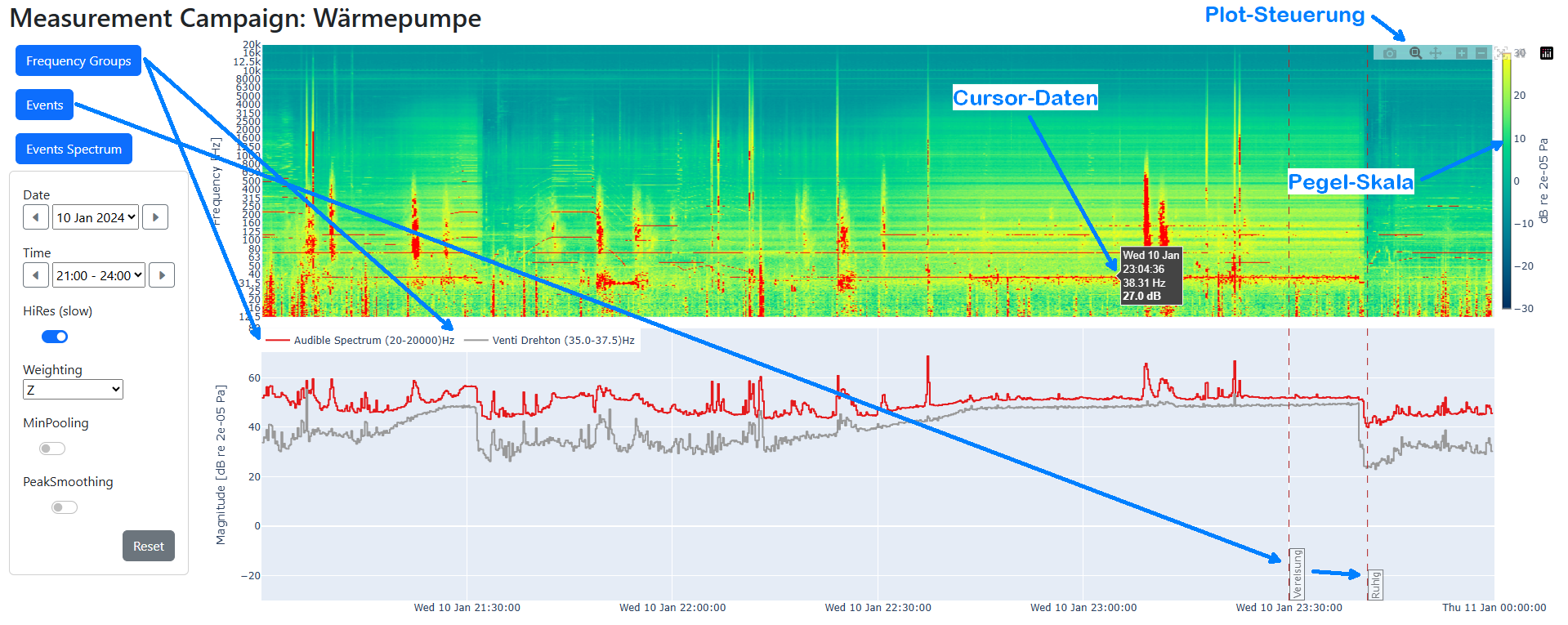
The upper section shows a spectrogram (time x frequency). Colours range from dark blue (very weak) to yellow (strong). For instance, a yellow line at 40 Hz indicates a strong 40 Hz component during the highlighted period.Below are the level-time curves of the active frequency groups. Each group has its own colour. For clarity, show no more than five at once; click a group in the legend (at the upper edge of the level-time curves) to hide its curve.
The Evaluation graph starts in zoom mode; drag to enlarge a region. Extra controls include Pan and Autoscale. Double-clicking within the graphic will show again the complete view. Events appear as dashed vertical lines annotated with their names. Zoom actions affect both spectrogram and curves synchronously.
Buttons
- Frequency Groups — see the Frequency Groups section
- Events Spectrum — see the Events Spectrum section
- Export Report — see the Export Report section
Time slice and graph parameters
Date
Select the desired day via dropdown or the forward/back arrows to move one day.Time
Select any three-hour window via dropdown or the arrows to move one hour.Full-Resolution
The initial view uses low resolution over time for speed, aggregating measured blocks by 100 in the full-campaign view and by 10 in the daily view. When analysing a single day or a 3-hour window, enabling “Full-Resolution” can show more temporal detail. Frequency resolution is always maximal.Weighting
Choose a weighting curve to weight each frequency band according to human perception:Z - linear (no weighting)
A - approximates 40 phon curve; standard legal metric, representing human perception
C - based on 80 phon curve; for loud sounds
ISO 389-7 P1 - threshold of hearing for the most sensitive 1 % of listeners; values below 0 dB can be considered inaudible
The chosen weighting affects the level-time curves.
PeakSmoothing
Suppresses tonal bursts shorter than 30 s, useful for machinery noise analysis.Frequency Range
Use the fmin and fmax drop-down menus to restrict the spectrogram and level-time curves to a specific frequency band. For example, set fmin = 20 Hz and fmax = 200 Hz to view only low-frequency contributions. fmin must be less than fmax. This setting does not affect the computation of the level-time curves.Reset
Restores the full-campaign view.
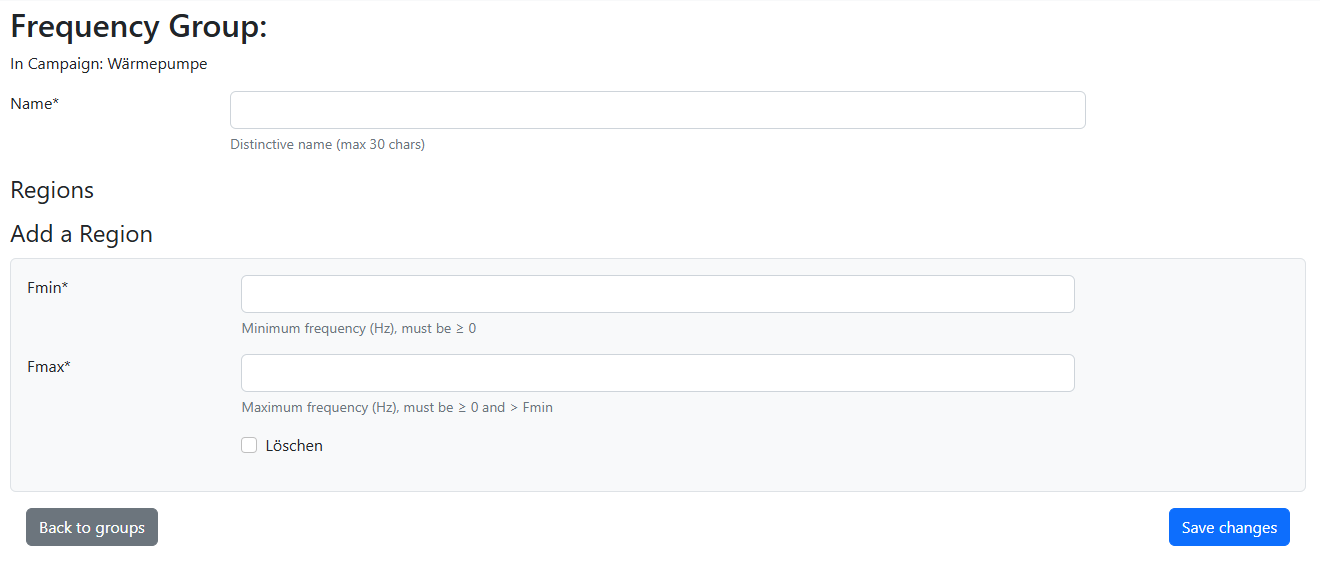
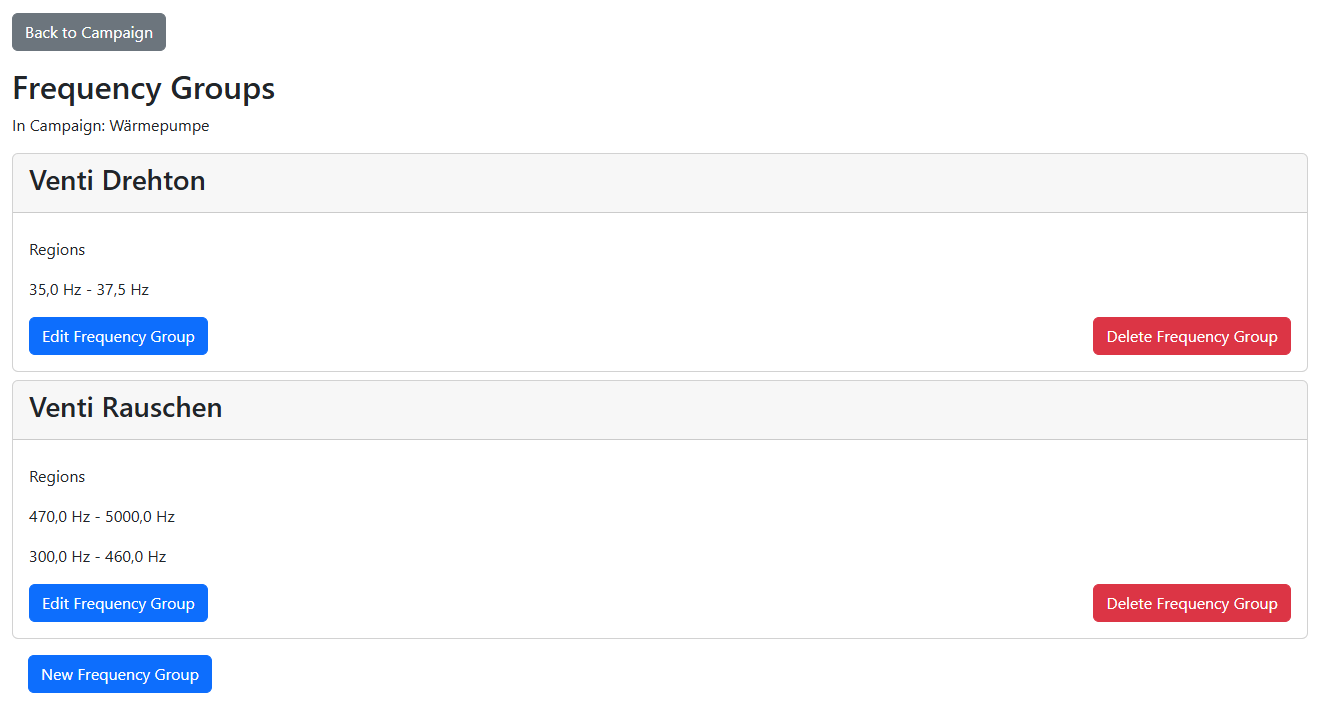
Create and edit frequency groups displayed as level-time curves. Each group belongs to a specific campaign and contains one or more frequency ranges. Helpful for highlighting contributions of specific sources that stand out in certain bands.
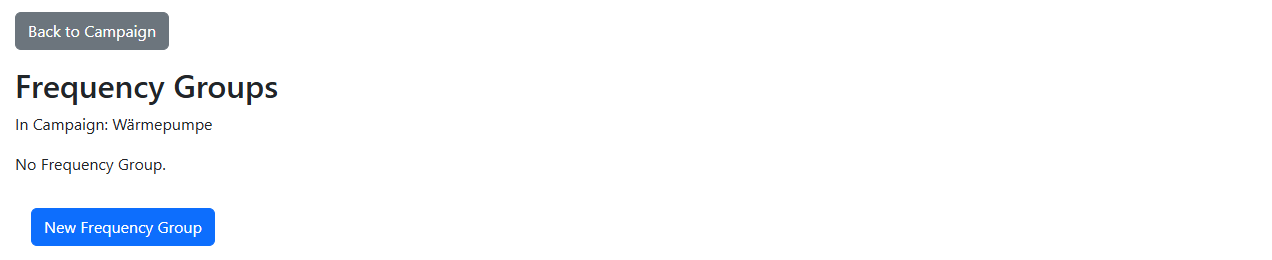
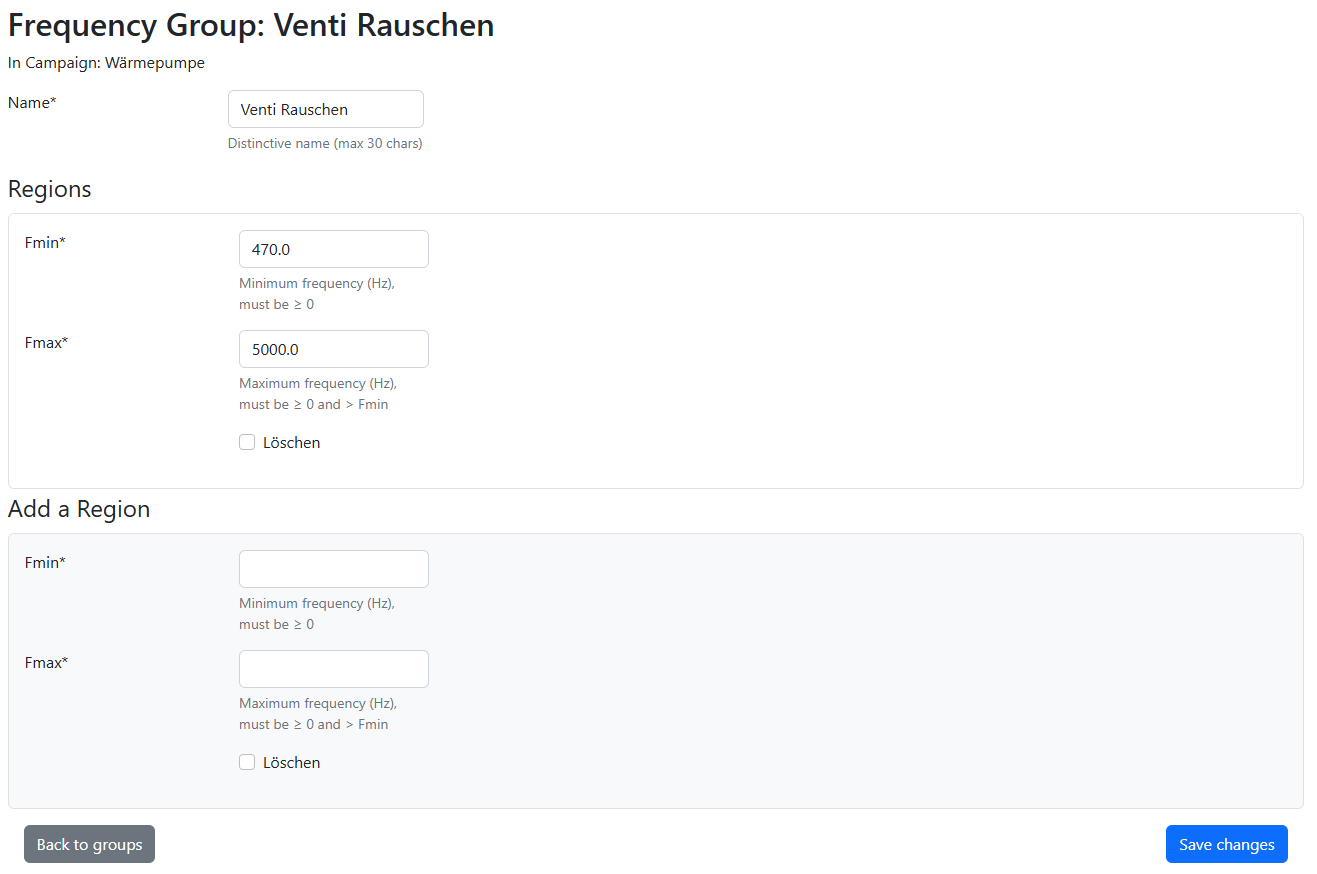
Initial view (no frequency group defined)
Add a new frequency group
Add new frequency range to existing group
View with defined frequency groups
Tips & tricks for frequency groups
Right-click the “Frequency Groups” button and open it in a new tab so the analysis view stays visible; after editing groups simply reload the analysis tab using the refresh button of your browser. Use zoom and the cursor in the spectrogram to find min/max frequencies to set up relevant frequency regions. All fields marked * are required; use a dot as the decimal separator.
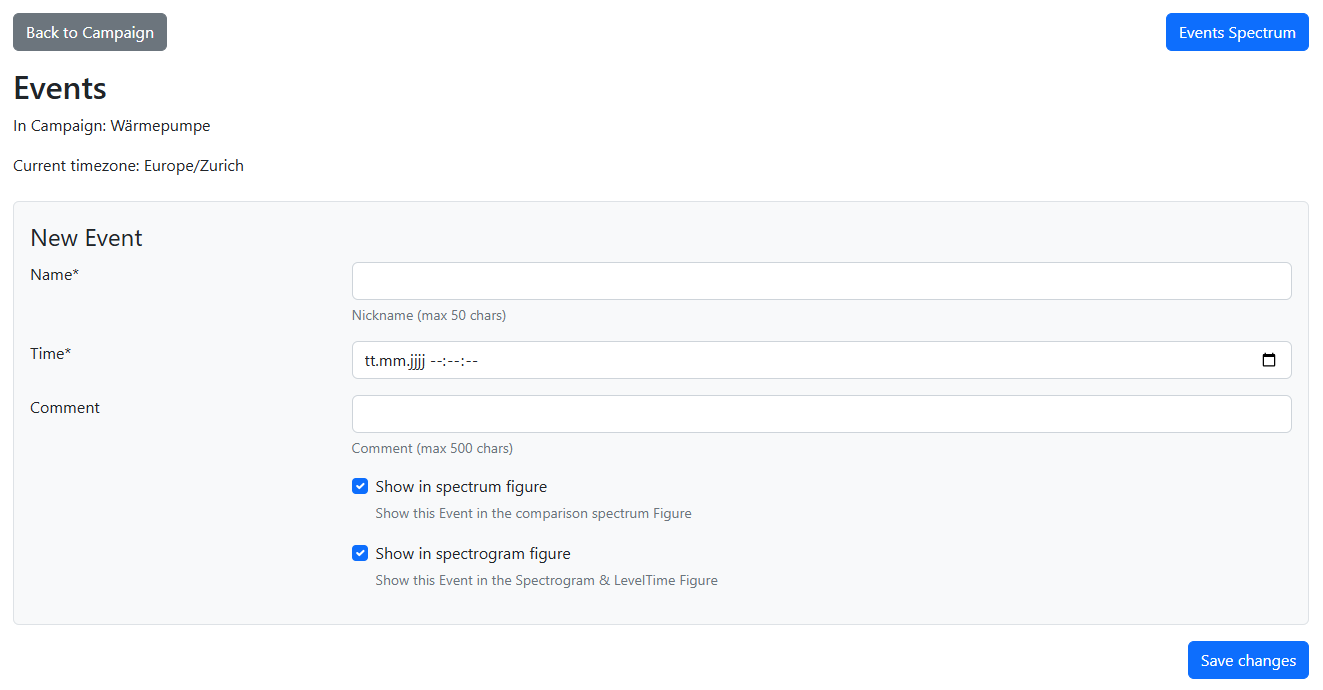
Events let you mark moments in time during a measurement. They are tied to your user account and appear in every campaign where measurement data covers that time — so you only need to log an event once.
Each event has:
After the measurement, check the Noise Audible field and the measured spectrum to see which frequency contributions match your perception. All fields marked * are mandatory. For readability, enable at most five events at once via “Show in spectrum figure”.
Each event has:
- Date/time — when the event occurred
- Name — short identifier (max 50 characters)
- Comment — optional note (max 500 characters), shown as a tooltip on the spectrogram
- Noise Audible — was noise perceptible at that moment? Choose Yes, No, or Unsure
- Show in spectrogram figure — display the event as a dashed vertical line on the Evaluation graph
- Show in spectrum figure — display the event in the Events Spectrum comparison view
Initial view / Add a new event
Tips & tricks for events
You can log events during the measurement — the time field defaults to the current moment, so you can record an observation in real time (e.g. “heat pump just turned on”).After the measurement, check the Noise Audible field and the measured spectrum to see which frequency contributions match your perception. All fields marked * are mandatory. For readability, enable at most five events at once via “Show in spectrum figure”.
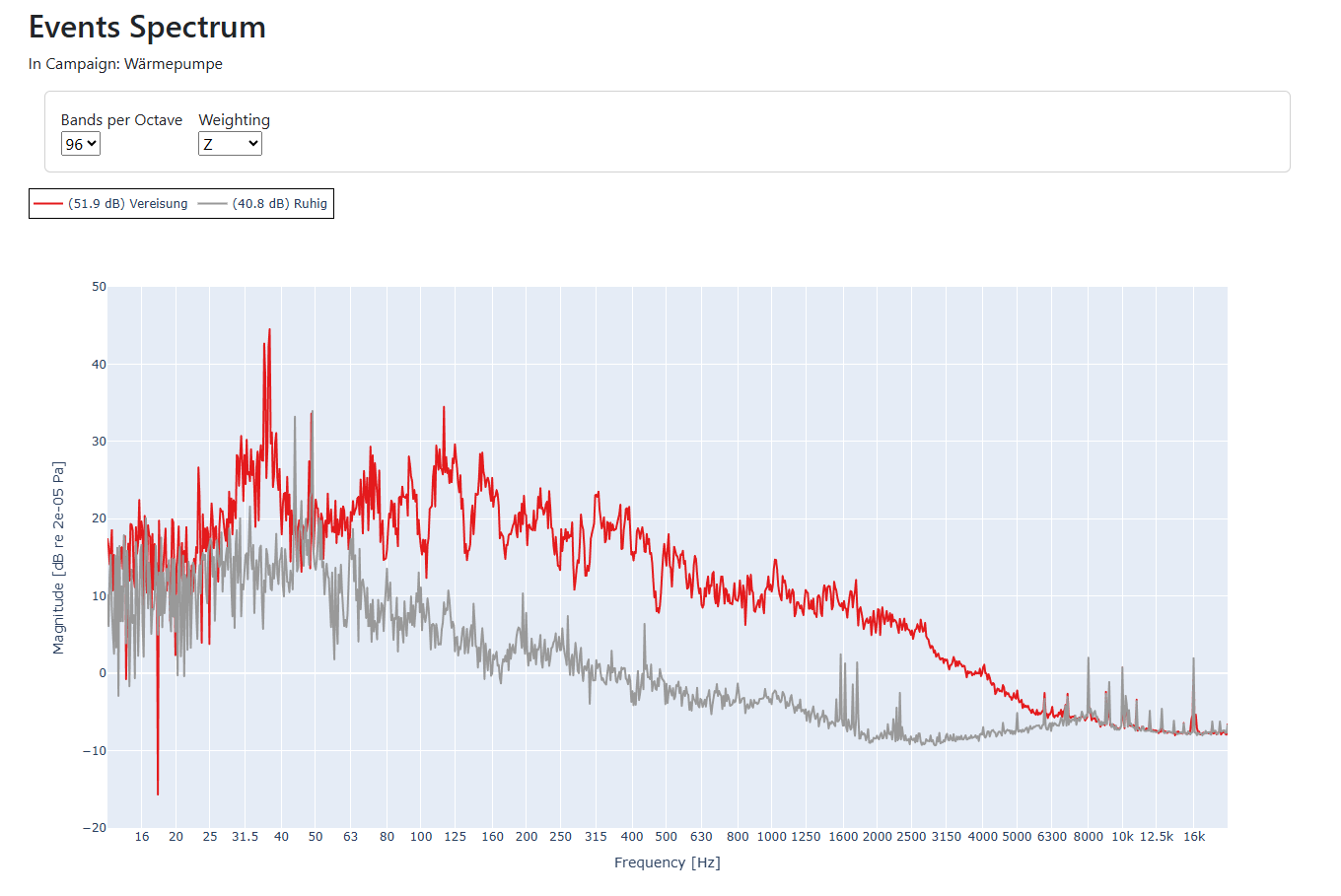
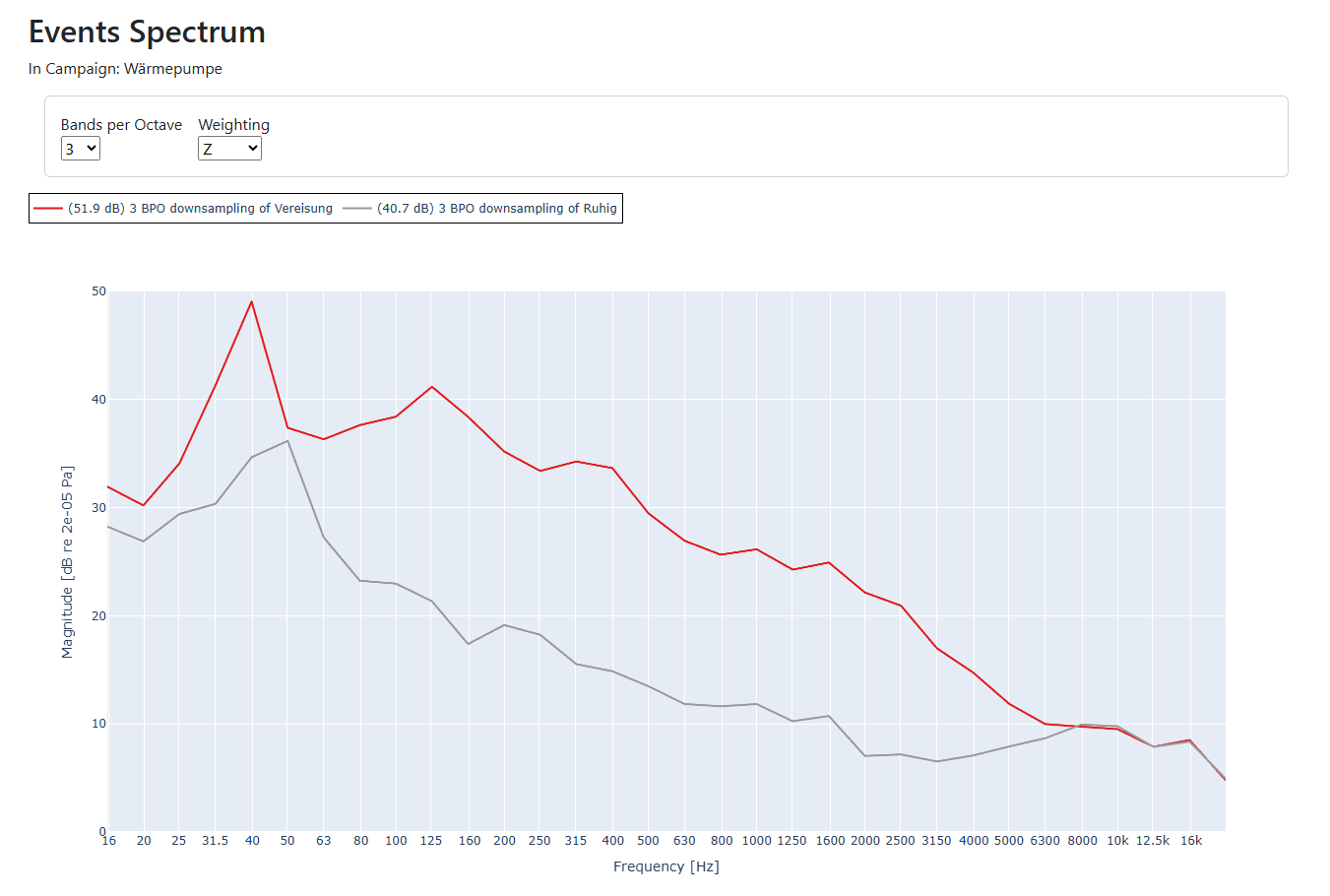
For each event you create, the measured spectrum at that time can be displayed in the “Events Spectrum” view, provided the campaign has data at that moment. Check “Show in spectrum figure” to include an event in the comparison.
1 BPO: whole octaves; shows overall energy distribution. Up to five curves compare well.
3 BPO: third-octaves; standard acoustics resolution; coarse for tones, still good overview.
12 BPO: good compromise: detail x clarity; compare up to three curves.
96 BPO: very narrow bands, high resolution; separates tones > 0.725 % apart. Compare max. two curves.
Interesting comparisons:
Quiet vs. loud phase
Background vs. operating noise
Different operating modes
Weighting: Use A-weighting to highlight frequency ranges critical for the A-weighted level.
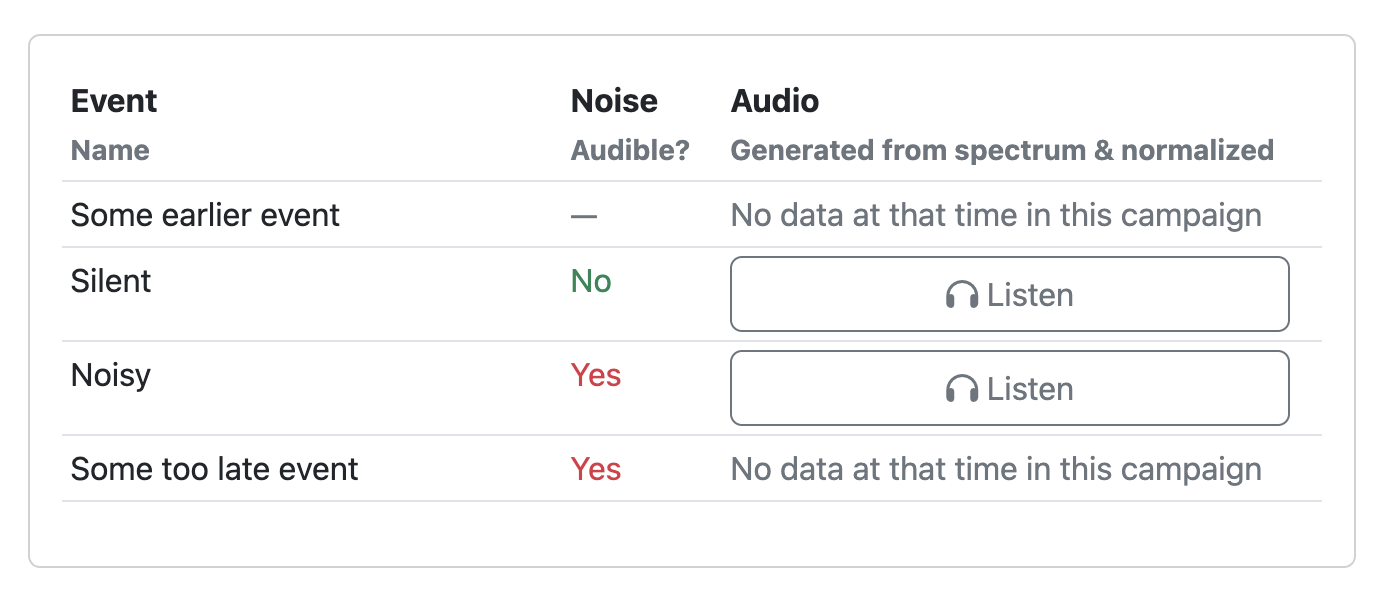 For each event where measurement data is available in the current campaign, the table below the spectral plot shows a Listen button. Clicking it synthesises a 10-second shaped noise signal from the band spectrum at that event time, normalised for playback. This lets you hear an impression of the steady frequency components measured at that moment (without short-time modulations), helping you identify what that spectrum sounds like.
If no data exists at the event time for the current campaign, a note is shown instead.
Example with 96 BPO bandwidth
Example with 3 BPO bandwidth
Tips & tricks for Events Spectrum
Which bandwidth suits which task:1 BPO: whole octaves; shows overall energy distribution. Up to five curves compare well.
3 BPO: third-octaves; standard acoustics resolution; coarse for tones, still good overview.
12 BPO: good compromise: detail x clarity; compare up to three curves.
96 BPO: very narrow bands, high resolution; separates tones > 0.725 % apart. Compare max. two curves.
Interesting comparisons:
Quiet vs. loud phase
Background vs. operating noise
Different operating modes
Weighting: Use A-weighting to highlight frequency ranges critical for the A-weighted level.
Auralization Table
If no data exists at the event time for the current campaign, a note is shown instead.
Noise Audible column
The table also shows whether noise was perceptible at each event time, as recorded when the event was created:- Yes — noise was clearly audible
- No — no noise was perceived
- Unsure — uncertain
Click the Export Report button (PDF icon) on the campaign detail page to open the report configuration form.
Analysis Options
- Minimum / Maximum frequency — restrict the spectrogram frequency range (e.g. 20 Hz – 200 Hz for low-frequency focus)
- Frequency Weighting — choose Z, A, C, or ISO 389-7 P1 weighting
- PeakSmoothing — filters out short-term level increases in each frequency band
Content
- Include Events table and spectrum comparison — adds a summary table of all events (with Noise Audible status) and a spectrum comparison at full frequency resolution
- Include 3 bands per octave spectrum comparison — adds a traditional third-octave resolution spectrum alongside the full-resolution comparison
Days to Include
Select which measurement days appear in the report. All days are checked by default; uncheck any you do not need.Generated report
After clicking Generate Print View the report is generated (may take up to 10 minutes). The result contains:- Cover page with campaign summary
- Full-campaign overview spectrogram
- Daily detail pages (one per selected day)
- Events summary table and spectrum comparison (if included)
Tips
- Use PeakSmoothing to highlight sustained levels and suppress short-term peaks.
- If the measurement period is long, select only the relevant days to speed up generation.
Quick guide for setting up and operating the Sonotrazer measurement device: unboxing, assembling, placement, power on/off, and return shipping.
Open Device Instructions
Open Device Instructions
What Is Sound and How Do We Measure It?
- Sound consists of air pressure fluctuations that our ears perceive.
- This signal can be accurately measured and digitalized with a high quality calibrated measurement microphone.
- Any sound consists of multiple tonal components at varying frequencies and amplitudes.
Frequency and Human Hearing
- Frequency (Hz): The number of pressure fluctuation cycles per second.
- Humans hear from approximately 20 Hz (very low) to 20,000 Hz (very high).
- Low frequencies sound like rumbles; high frequencies sound like hisses or whistles.
Frequency Bands: Perceptual Intervals and Divisions
- Frequency bands are contiguous intervals of the frequency range.
- Humans perceive pitch logarithmically; doubling the frequency (e.g., 250 Hz → 500 Hz) sounds like an “octave” increase in pitch.
- Octave bands divide frequencies in intervals half- and double-steps apart (e.g., 63 Hz, 125 Hz, 250 Hz, 500 Hz, 1 kHz).
- 1/3-octave bands split each octave into 3 equal log-steps (present in most tools), 1/12-octave bands into 12 steps, and 1/96-octave bands into 96 steps for very fine resolution (default in our tool).
Decibel Scale & Perception
- The amplitude of pressure fluctuations are translated into a sound pressure level in decibel (dB).
- By definition, 0 dB corresponds to the reference pressure P₀ = 20 µPa (the typical threshold of human hearing at 1kHz).
- +10 dB corresponds to a tenfold increase in sound energy and is perceived roughly as twice as loud; -10 dB is perceived as half as loud.
- Because of its logarithmic nature, large pressure variations compress into manageable numbers and match more closely our perception of loudness.
Frequency Weightings
- Our ears are not equally sensitive across all frequencies.
- A-weighting (dB(A)): Mimics human hearing, attenuating low and very high frequencies.
- Z-weighting (dB(Z)): Flat response across all frequencies, for objective analysis.
The Spectrogram: A Time-Frequency Table
- A spectrogram is a visual grid showing loudness in each frequency band (rows) over time blocks (columns):
- Horizontal axis: Time
- Vertical axis: Frequency
- Colors: Bright colors = loud; dark colors = quiet.
- This way the exact time, frequency and amplitude level of a disturbance can easily be visually spotted in a measurement campaign.
Harmonic Components vs. Impulsive Noise
- Harmonic components (e.g., rotating machinery):
- The fundamental tone corresponds to rotation speed (e.g., 30 Hz at 1800 RPM).
- Overtones are often present at integer multiples (2x, 3x, etc.) and appear as parallel lines on a spectrogram.
- Impulsive noise (e.g., bangs, clicks):
- Short and broadband, showing up as vertical streaks across many frequencies on a spectrogram.
Physical Propagation: Low vs. High Frequencies
- Low frequencies (< 200 Hz) pass easily through walls/floors and produce room modes, additionally are hard to localize by the human hearing system. Low-frequency disturbances are often the main cause for discomfort inside buildings, so inspecting bands below 200 Hz first is good practice.
- High frequencies (> 2 kHz) are way more easily absorbed by building materials and obstacles, therefore less likely to carry over long ranges. They are easier to locate by ear.
For further learning, see HyperPhysics: Sound Concepts.